

Magento vs Shopify vs WooCommerce: Which One to Choose in 2026?
Choosing the ideal eCommerce platform is not an easy decision.
With over 800 Content Management System (or CMS) platforms available in the market, it’s quite hard to make the right decision.
Each of them provides different features, pricing options, and opportunities to grow your brand.
Among the top leaders are Magento, WooCommerce (operating on WordPress), and Shopify.
But here’s the question: which eCommerce platform is best for your business? Which one you should choose: Magento, Shopify, or WooCommerce?
Or it’s better to invest in custom web development?
To help you understand which CMS platform is best for your brand, below we list some key factors:
- Ease of use
- Security
- SEO
- Speed
- Features
- Customer Support
- Pricing
We will consider these factors when choosing the best eCommerce platform in 2026.
Magento vs Shopify vs WooCommerce: Features Comparison
Let’s see the whole picture of comparison in one table first:
| Feature | Magento | Shopify | Woocommerce |
| Ease of Use | High learning curve, requires some technical knowledge | User-friendly, quite easy to use | User-friendly, quite easy to use |
| Security | Regular security patches, timely notifications, dedicated user community | All security measures provided, built-in SSL, PCI-DSS compliant | Requires hosting provider for SSL, WordPress updates for security and bug fixing |
| SEO | Advanced SEO plugins, canonical tags, XML sitemap | Built-in SEO features, easy to optimize | Good SEO features, but requires additional plugins |
| Speed | Requires optimization, high performance with proper setup | Fast and reliable, optimized for eCommerce | Requires optimization, fast with proper setup |
| Customer Support | Large community, official support for Magento Commerce | 24/7 support through phone, email, and instant messaging | Community-based support, online documentation, tutorials, reference materials |
| Pricing | Free open-source version, paid version for additional features | Monthly subscription plans, transaction fees | Free plugin, paid extensions and hosting fees |
Now, let’s get go through the details and discuss each of the components.
Ease of Use of Magento vs Shopify vs WooCommerce
Magento
Magento (or Adobe Commerce) is one of the most known CMS platforms worldwide.
If you’re wondering how easy is Magento to use, I have to state that it all depends on how familiar you are with the platform.
But it might require some technical knowledge.
Overall, Magento is easy to use if you’re familiar with the CMS.
The top reasons are:
- Customizable Dashboard: Magento’s admin panel provides a customizable dashboard. Above all, it lets users see the main information and metrics in a nutshell.
- User-Friendly Navigation: The admin interface has a user-friendly navigation – clear menu tabs and submenus. Plus, they let users easily find and access the store’s features.
- Sales Management: Magento’s admin panel has a Sales tab. It makes order management, invoicing, shipments, and other sales tasks much more convenient.
- Product and Category Management: Users can easily create and manage products. They can do this through the Catalog tab. This allows for organizing and showing products on the storefront.
- Security Features: Magento has security best practices. These include using the Magento Security Scan Tool, for example. You also make unique admin panel routes, enable reCaptcha, and stop admin account sharing.
You can also explore some discussions on your own on Reddit here.
Shopify
Shopify is one of the top-growing eCommerce platforms today.
Compared to Magento, Shopify’s interface is a bit easier to use. Here’s why:
- Search bar: The Shopify admin has a search bar at the top. It lets merchants quickly find what they want. This could be a setting, feature, or order.
- Access to apps: Shopify made it easier to access and launch apps directly from the admin. You can do this at any time by clicking the search bar, and the sidebar, or using keyboard shortcuts.
- Pinning apps: Business owners can now pin the apps they use most to the sidebar. This makes them quickly accessible from anywhere in the admin.
- Apps: Shopify has a big app store. It has apps for everything from chatting with customers to those that help with shipping.
- Settings: The Shopify admin has a settings section. Users can set their store’s name, currency, and language there. They can also set payment gateways and shipping rates and methods.
WooCommerce
Compared with Magento and Shopify, WooCommerce is just a plugin, operating on WordPress CMS. It’s a strong and flexible open-source plugin that turns any WordPress website into a full online store.
Let’s see the ease of using WooCommerce:
- Integration with WordPress: As stated above, WooCommerce is built on top of WordPress and has all its features.
- User-Friendly Navigation: WordPress is well-known for its easy-to-use dashboard. It has clear menu tabs and submenus that let users easily find and access store tools.
- Product and Category Management: WooCommerce lets users create and manage products and categories (Catalog tab section).
- Order Management: WooCommerce’s admin panel has a dedicated Orders tab. It makes order management, invoicing, shipments, and other sales tasks easier.
- Reports and Analytics: The plugin provides some analytics details and shows them visually. So the users can see the overview of sales, orders, and other details.
Our Verdict
Among Magento, Shopify, and WooCommerce, Shopify is easier to use.

Let’s discuss the security now.
Security of Magento vs Shopify vs WooCommerce
Magento, Shopify and WooCommerce have their unique security features.
Let’s have a look at the table with all the security features of each platform:
| Feature | Magento (Adobe Commerce) | Shopify | WooCommerce |
| Overall Responsibility | Requires server-side security expertise | Managed by Shopify | Requires plugin installation and management |
| SSL Certificate | Requires server-side configuration | Included | Requires plugin installation |
| PCI Compliance | PCI DSS compliant | PCI DSS compliant | Requires PCI compliance plugin |
| Payment Processing Security | Level 1 PCI DSS compliant payment gateway integrations | Level 1 PCI DSS compliant payment gateway integrations | Requires secure payment gateway integrations |
| Fraud Detection | Requires integration with fraud detection services | Built-in fraud analysis tools | Limited built-in tools, requires plugins |
| User Account Security | 2FA available | Two-factor authentication (2FA) | Requires plugins for 2FA |
| Software Updates | Requires manual updates for core software and themes | Automatic updates managed by Shopify | Requires manual updates for core software and plugins |
| Security Patching | Requires manual patching of core software and themes | Shopify applies security patches automatically | Requires manual patching of core software and plugins |
| Developer Resources | Open-source platform with full access to code | Limited access to core code | Open-source platform with full access to code |
Our Verdict
Overall, all three platforms are secure enough.
But based on the analysis of the table above, we’ve put it in this sequence:
- Shopify: If you want a fast solution to open an eCommerce business quickly, choose Shopify. It has the highest level of user-friendliness for security. If something goes wrong, it also has a great support team (for all plans). So no need to worry about not having technical knowledge.
- Magento: Magento requires some technical knowledge to make a website secure. However, it offers the most advanced set of built-in security features. This makes it a strong option for larger businesses with complex security needs.
- WooCommerce: WooCommerce requires the most technical knowledge to secure effectively. As an open-source platform, it’s the responsibility of the user to make the necessary optimizations to make the website secure.
SEO Features of Magento vs Shopify vs WooCommerce
Today, SEO is one of the top reasons when people consider using a CMS platform.
Eventually, it’s one of the top traffic sources for their online stores.
In fact, close to 43% of eCommerce traffic comes from organic search.
See the breakdown of how Magento, Shopify, and WooCommerce stand in terms of built-in SEO features:
| Feature | Magento | Shopify | WooCommerce |
| On-page Optimization | Granular control over meta titles, descriptions, URLs, and image alt text | Good control over meta titles and descriptions, limited URL control | Inherits SEO strength from WordPress; extensive plugin options for meta control, structured data, and more |
| Technical SEO | Clean codebase optimized for fast loading speeds; built-in sitemap generation | Generally fast loading speeds; automatic sitemap generation | Relies on WordPress core and plugins for technical SEO; potential for slowdowns with complex themes/plugins |
| Content Management | Limited built-in content management system (CMS) | Basic blog functionality; relies on external apps for advanced content management | Integrates seamlessly with WordPress, a powerful CMS platform |
| Mobile-friendliness | Offers responsive themes for mobile optimization | All themes are mobile-responsive by default | Relies on theme choice for mobile optimization (most themes are mobile-friendly) |
| App Marketplace | Vast extension marketplace with a wide range of SEO tools | App store with some SEO plugins, but limited compared to Magento | Huge plugin library with a plethora of SEO tools and functionalities |
In this case, the winner for SEO features depends on your needs:
- Magento: Magento offers full control and customization over on-page optimization and technical SEO. However, just like in the case of security, in this case as well it requires some technical knowledge.
- Shopify: Shopify’s interface helps it compete with other platforms for ease of use. Plus, it has an app store with lots of other extensions to boost SEO. Which are not cheap, in addition.
- WooCommerce: If you’ve decided to boost your brand’s performance through content, then this should be your choice. WooCommerce perfectly integrates with WordPress and allows for extensive SEO customization.
Our Verdict
If you prioritize control and customization, Magento might be ideal for you.
If you’re new in the business and want a quick and easy solution with built-in SEO features, then choose Shopify.
On the other hand, if content is your primary channel of organic traffic, WooCommerce with WordPress integration is the option.
Speed Comparison of Magento vs Shopify vs WooCommerce
Website speed is one of the most vital factors for user experience when visiting an online shop.
First of all, let’s have a look at the speed comparison of Magento vs Shopify vs WooCommerce:
| Feature | Magento | Shopify | WooCommerce |
| Out-of-the-box Speed | Generally slower due to complex codebase | Generally faster due to optimized infrastructure | Inherits speed from hosting; can vary based on theme and plugins |
| Server Control | Requires dedicated hosting for optimal speed | Server infrastructure managed by Shopify | Requires user-managed hosting |
| Caching | Built-in caching mechanisms | Built-in caching with additional app options | Relies on caching plugins for optimization |
| Image Optimization | Limited built-in tools | Tools for image resizing and compression | Requires image optimization plugins |
| Code Optimization | Requires developer expertise for code cleaning | Optimized codebase managed by Shopify | Relies on theme and plugin code quality |
In general, Magento and Shopify websites are faster than WordPress websites.
However, it all depends on skilled developers.
Let’s analyze the Mobile speed of each website, using Google’s PageSpeed Insights tool.
To make equal conditions, we have analyzed the homepage (main webpage) speed of all three platforms. In general, it should be the most optimized page of the website.
Let’s start with Magento:
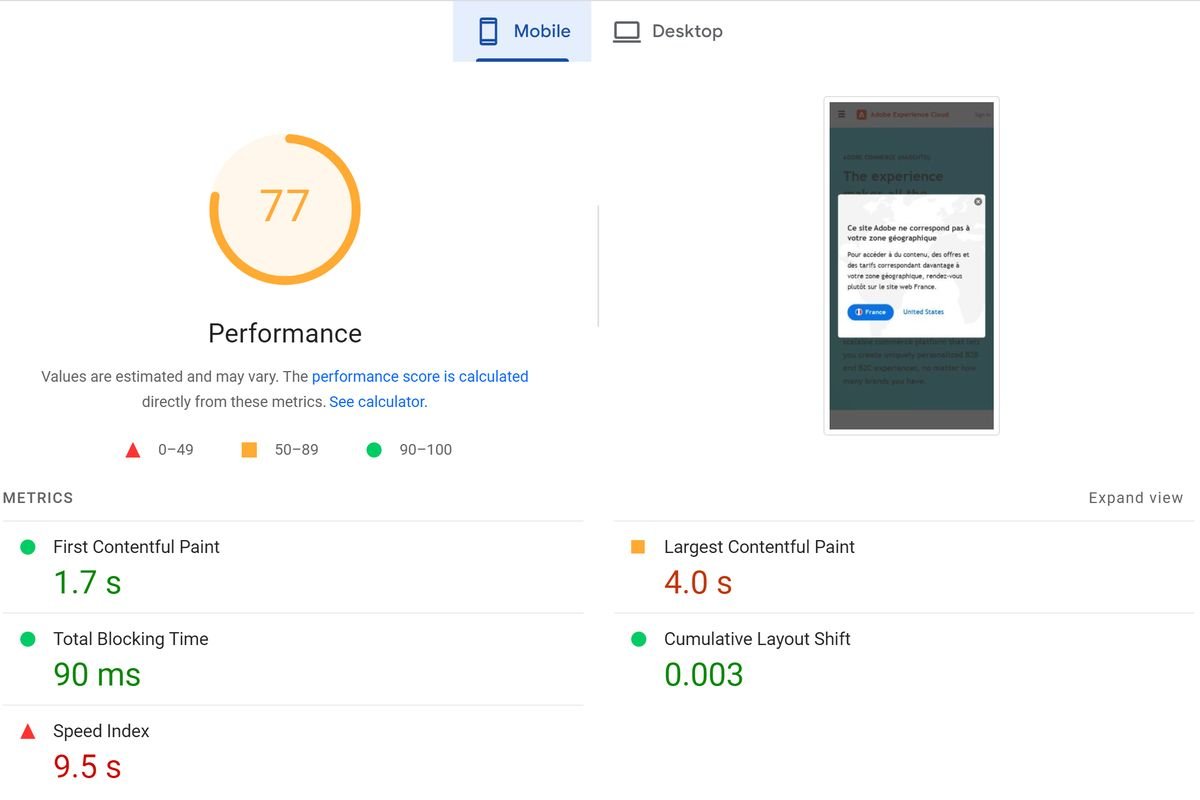
As you can see from the analysis screenshot above, the mobile speed of Magento’s website is 77 which is quite promising.
Now, let’s see how Shopify performs:
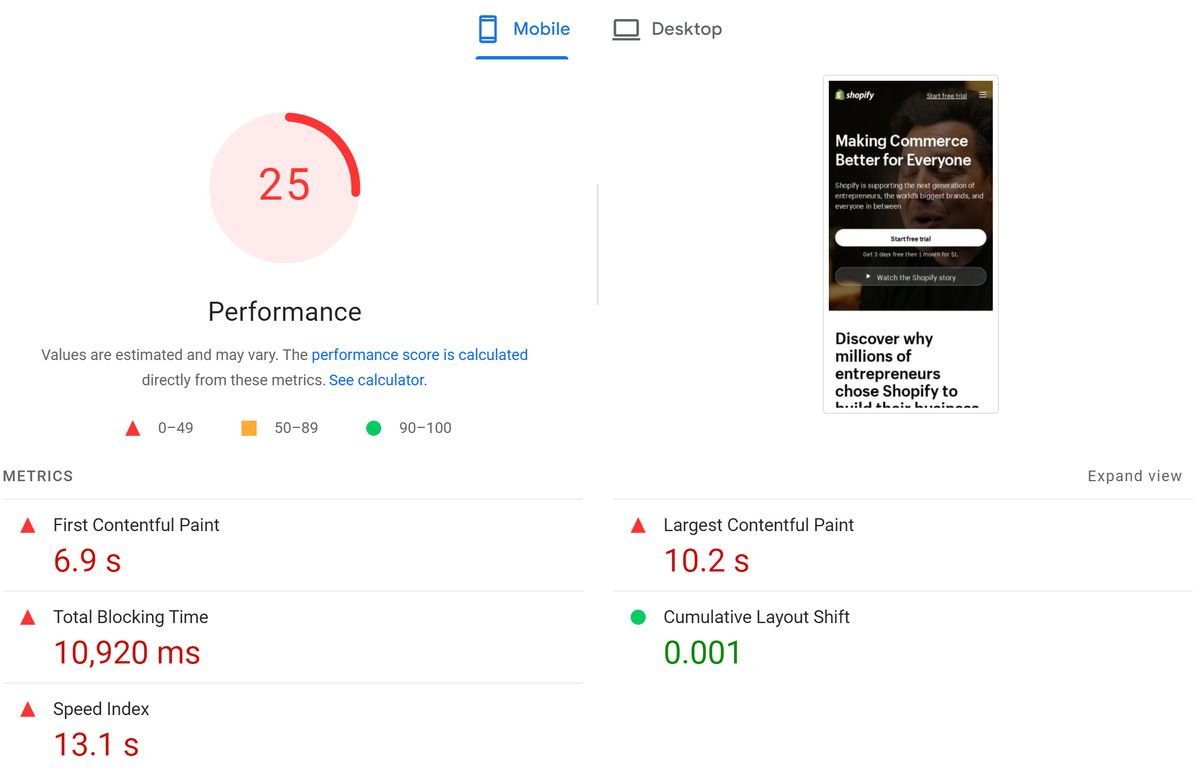
The mobile speed of Shopify’s homepage is only 25. Which is not as desired.
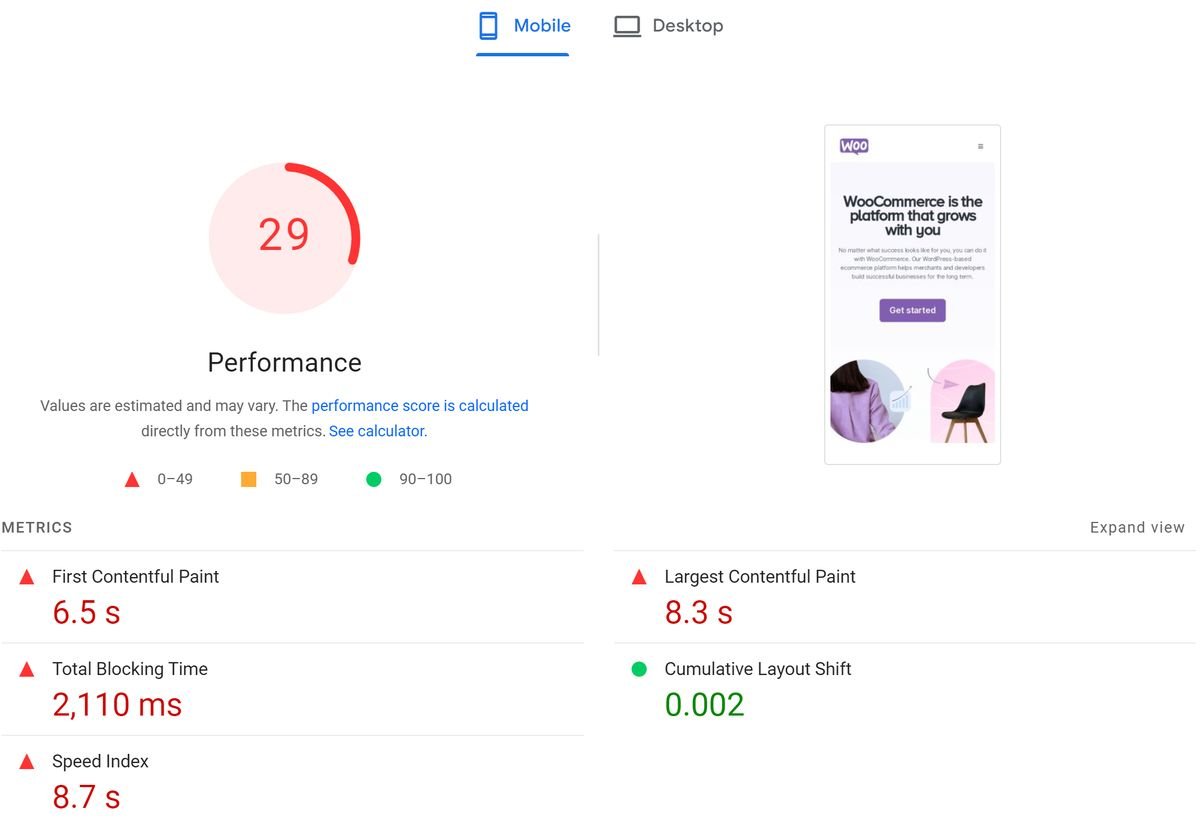
Concerning WooCommerce, the situation is about the same with a 29 speed score (see analysis screenshot below):
Our Verdict
Obviously, the winner for website speed is Magento.
Customer Support Component
This component is really important when considering an eCommerce platform.
Why?
Simply because one should have great support. This is because when something goes wrong, they can contact support and fix the issue quickly.
Let’s analyze which platform has the best support (see the table below):
| Feature | Magento | Shopify | WooCommerce |
| Support Channels | Phone, email, community forums (limited) | Phone, live chat, email, extensive knowledge base | Community forums, email |
| Support Tiers | Paid tiered support plans with varying response times | Paid and free plans depending on your Shopify subscription | Relies on community or paid developer support |
| Technical Expertise | Support geared towards developers | Generally good for non-technical users | Requires some technical knowledge to navigate |
| Response Times | Varies depending on plan and issue severity | Generally faster response times | Unpredictable, relies on community response |
When it comes to fast available support, the winner is Shopify as only this platform has Live Chat Support.
And it helps to address any problem, in the shortest time possible.
Pricing of Magento vs Shopify vs WooCommerce
The pricing strategy of any business owner is clear – to get the desired product/idea, at a cheaper option.
And they are right!!
Let’s see the pricing overview of Magento, Shopify, and WooCommerce (see the table below):
| Feature | Magento | Shopify | WooCommerce |
| Pricing Model | Open-source (free) or paid version (Magento Commerce) | Subscription-based plans | Free (plugin for WordPress) |
| Monthly Cost | Variable (depends on hosting, extensions, and potentially developer fees) | $29 – $2,300 / month | Free, but extensions and themes can add cost |
Our Verdict
In the case of pricing, the cheapest option is WooCommerce.
Above all, WooCommerce itself is free to download and install as a WordPress plugin. This makes it the most budget-friendly choice.
However, running an online shop with WooCommerce requires additional expenses, including:
- Website hosting: You’ll need a reliable hosting plan to run your online store. However, reliable hosting services are not that cheap.
- Domain name: While domain registration fees are typically minimal, you will still need to spend around $14 to get a domain.
- Extensions and themes: WooCommerce offers additional extensions for payments, shipping, tracking, marketing, etc. Many are free, but premium extensions can add additional costs.
Shopify offers subscription plans with a predictable monthly cost. These plans include hosting, security, and some built-in features. Themes are also free, although with very few options. However, you might still need additional paid apps for specific functionalities.
Magento Commerce (the paid version of Magento) offers a few plans with different functionalities. Infrastructure support, surge capacity monitoring and response, infrastructure level 99.9% SLA – Magento has it all.
So Which Platform to Choose for Your Brand: Onyx8 Team’s Advice
The answer is simple – it all depends on your business needs.
No matter if you want to build a corporate website, eCommerce platform or personal portfolio – investing in fast and converting website development should be the done accurately.
Onyx8’s team has extensive experience in building and scaling eCommerce brands. As a full-service eCommerce web development agency, we provide the following services:
- Custom website design
- Magento web design & development
- Shopify web development
- WooCommerce web development
- End-to-end SEO services
- Complete link-building services
Contact us for a Free consultation and dedicated web developers will help you build a strong, converting website and provide notable results.